Reading Schematics: Decoding Synth Circuit Diagrams
Published: November 30, 2025
📐 Why learn to read schematics?
A schematic is the universal language of electronics—a precise map showing how components connect and signals flow. While you can build kits by following step-by-step instructions, understanding schematics unlocks deeper capabilities: troubleshooting malfunctions by tracing signal paths, modifying circuits to customize behavior, designing your own modules by studying existing designs, and participating in technical discussions on forums. A schematic tells the story of how a circuit works; learning to read that story transforms you from kit-builder to circuit designer.
Schematics abstract away the messy reality of physical components—bent leads, colored wires, cramped PCB layouts—replacing them with clean symbols and logical connections. This abstraction is powerful: the same schematic can be implemented on breadboard, stripboard, or custom PCB without changing its meaning. Good schematics guide your eye through the circuit's functional blocks, showing inputs on the left, outputs on the right, and power connections at top and bottom. Learning these conventions makes any schematic immediately more approachable.
Don't expect to understand every detail on first reading—even experienced engineers trace complex schematics with pen and paper, identifying stages and signal flow. Start with simple circuits (a 555 timer oscillator has maybe 10 components) and gradually work up to full synthesizer voices. The goal isn't memorizing every symbol but developing pattern recognition: "this looks like a voltage divider," "that's an inverting amplifier," "those capacitors are AC coupling." Sparkfun's How to Read a Schematic guide is an excellent foundational resource.
The essential symbols you'll see everywhere

Resistor (US)
Limits current flow

Resistor (EU)
Rectangle style

Capacitor
Non-polarized
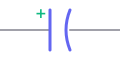
Electrolytic Cap
Polarized (+/−)

Diode
One-way current

LED
Light-emitting diode
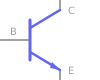
NPN Transistor
Arrow points out
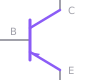
PNP Transistor
Arrow points in
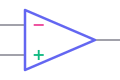
Op-Amp
+/− inputs, output


Ground Symbols
0V reference
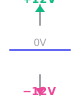
Power Rails
±12V supply
Connection conventions: A dot where lines cross means electrical connection; crossing lines without a dot don't connect. Component values appear next to symbols (10kΩ, 100nF). Reference designators (R1, C5, U2) match the PCB silkscreen. Reference Electronics Tutorials for additional symbol charts.
➡️ Following signal flow and functional blocks
Start by identifying inputs and outputs—usually marked as IN, INPUT, OUTPUT, OUT, or connection points like 1/4" jacks labeled AUDIO IN/OUT. Trace the signal path from input toward output, following the connected components. Power supply sections are often drawn separately at the top or in a corner; focus on the signal chain first, then study power distribution once you understand what the circuit does.
Break the schematic into functional blocks: oscillator section (generates raw signal), filter section (shapes harmonics), amplifier/VCA section (controls volume), modulation section (LFOs, envelopes). Well-designed schematics draw boxes around these blocks or use whitespace to separate them visually. Component reference designators (R1, C5, U2, Q3) help you locate parts on the PCB—they should match between schematic and silkscreen.
Pay attention to coupling capacitors (AC coupling removes DC bias while passing audio), bypass capacitors (stabilize power supply lines), and feedback networks (resistors and capacitors connecting op-amp output back to input). These repeated patterns become recognizable: "that's a high-pass filter" (capacitor in series with resistor to ground), "that's gain set to 10" (100kΩ feedback resistor with 10kΩ input resistor on an inverting op-amp). Pattern recognition accelerates comprehension dramatically.
🔍 Understanding component values and their meaning
Component values determine circuit behavior. In filters, capacitor and resistor values set cutoff frequency: smaller capacitance = higher cutoff. In oscillators, they set frequency. In amplifiers, resistor ratios set gain. You don't need to calculate exact values initially—just understand that changing a 10kΩ resistor to 100kΩ (10× increase) has predictable effects: lower current, higher impedance, different frequency response.
Capacitor units can be confusing: 100nF = 0.1µF = 100000pF (all the same value in different units). Schematics often use µF (microfarad), nF (nanofarad), and pF (picofarad). Resistors use kΩ (kilohms, thousands) and MΩ (megohms, millions). Values like 4.7kΩ or 2.2µF are industry standard "E-series" values—you'll see them repeatedly because they're what manufacturers stock. Unusual values (3.14kΩ, 65.2nF) suggest precision requirements or calculated designs.
Potentiometers (variable resistors) show maximum resistance: a 100kΩ pot labeled "CUTOFF" varies from 0Ω to 100kΩ as you turn the knob, changing filter frequency. Some schematics show wiper position with a number or letter (A for audio taper, B for linear). Datasheets for specific ICs (available from Texas Instruments or Analog Devices) contain reference circuits showing typical component values—excellent learning resources when you wonder "why did the designer choose those values?"
⚙️ Common synthesizer circuit patterns
These fundamental building blocks appear in nearly every synthesizer circuit. Learning to recognize them instantly accelerates your schematic reading.
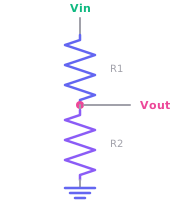
Voltage Divider
Two resistors in series create a specific voltage at their junction. Used for biasing and attenuators.
Vout = Vin × (R2 / (R1 + R2))
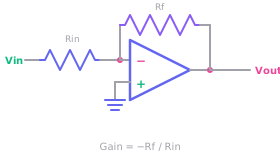
Inverting Amplifier
Signal enters − input through Rin, feedback resistor Rf sets gain. Inverts phase. Used for mixing and precise gain.
Gain = −Rf / Rin
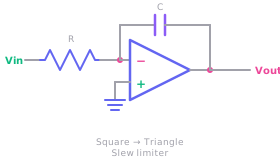
Integrator
Capacitor in feedback path instead of resistor. Converts square waves to triangles, implements slew limiting.
Waveshaping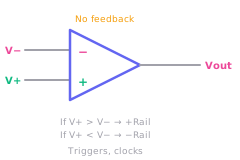
Comparator
Op-amp with no feedback. Output slams to +rail or −rail depending on which input is higher. Used for triggers and clocks.
Digital output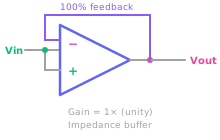
Voltage Follower (Buffer)
Output directly connected to − input. Gain is 1× (unity), but provides buffering and impedance matching.
High-Z inputRay Wilson's Music From Outer Space designs showcase these patterns in practical synth modules—an excellent resource for seeing how building blocks combine into complete instruments.
🛠️ Using schematics for troubleshooting and modification
When a circuit doesn't work, the schematic is your diagnostic map. Identify where signal should be present, then probe those points with oscilloscope or audio probe. Signal present at oscillator output but not at filter output? Problem is in the filter stage. Narrow the search by testing intermediate points until you find where signal disappears. Check voltages at IC power pins match schematic expectations—wrong voltages indicate power supply problems or short circuits.
Modifications start with understanding current behavior. Want more bass from a filter? Increase the capacitor values (try 2× or 4× larger). Want more resonance? Adjust feedback resistor values. Want slower envelope? Increase timing capacitor. Study multiple schematics of the same function (e.g., five different VCF designs) to see which component values change between implementations and which stay constant—constants are critical, variables are tunable.
Annotate schematics with measured voltages, notes about modifications, and observations during testing. Print them out and mark them up with colored pens—digital annotation works too, but pen-on-paper during bench work is often faster. Build a personal library of annotated schematics documenting your builds and experiments. This becomes invaluable reference material when you return to a project months later or troubleshoot a similar circuit in a different module.
📚 Building schematic reading skills progressively
Start simple: study the 555 timer datasheet application circuits. These single-page examples show complete working circuits with component values. Trace the signal flow, identify what each component does, then build the circuit on breadboard and verify it matches predictions. Move to simple op-amp circuits: buffers, inverting amplifiers, summing mixers. These appear in every synthesizer design.
Once comfortable with building blocks, tackle complete module schematics from open-source Eurorack projects on GitHub or designer repositories like Ornament & Crime (advanced firmware and modular design). Compare schematic to PCB layout—see how conceptual diagram becomes physical implementation. Identify the functional blocks (power, input buffering, core function, output driver) and understand how they connect.
Challenge yourself: take a schematic for a simple module, understand it completely, then redesign it with different component values or substitute ICs. Build both versions and compare. This hands-on experimentation—guided by schematic reading—builds intuition faster than passive study. Join the r/synthdiy subreddit and analyze schematics others post for critique. Explaining what a circuit does to someone else solidifies your own understanding and reveals gaps in knowledge.
💡 From reading to designing
The ultimate goal of schematic literacy is creating your own designs. Start by frankenstein-ing: combine an oscillator circuit from one source with a filter from another and an envelope from a third. Draw your own schematic showing how they connect. This forces you to understand interfacing: signal levels, impedances, power requirements. Your first "original" designs will be heavily derivative—that's normal and expected.
Use schematic capture software like KiCad (free, professional-grade) or EasyEDA (browser-based, beginner-friendly). Drawing schematics digitally teaches discipline: proper symbol usage, clear labeling, logical arrangement. KiCad can generate PCB layouts from schematics, completing the design-to-fabrication pipeline. Many professional Eurorack designers share KiCad projects—studying their schematic layout conventions teaches best practices.
Reading schematics is a skill that compounds over time. Each circuit you study adds patterns to your mental library. After a few dozen builds and many hours of study, you'll glance at a complex schematic and immediately grasp its structure: "VCO into VCF into VCA with two envelopes and an LFO." That intuition—built on foundations of symbol recognition, signal flow understanding, and hands-on verification—transforms you from consumer of other people's designs into creator of your own musical instruments.